Switch to Karya Keeper — the Simpler ClickUp Alternative
⚡ No Credit Card Required • Fast Setup • Built for Growing Teams
- TRUSTED BY MODERN TEAMS
Trusted By Modern Teams That Need More Than Task Tracking




- Trusted by 1000+ users
- Built for growing teams
- AI-powered reporting
- Decision Shortcut
Which Platform Fits Your Team Better?
| Capability | Karya Keeper | ClickUp |
|---|---|---|
| ⊕ Project & Task Management | Simple and structured | Feature-rich and highly customizable |
| ⊕ Workflow Visibility | Clear dashboards and Kanban workflows | Multiple views and deep customization |
| ⊕ Ease of Adoption | Built for faster team adoption | May require more setup for some teams |
| ⊕ Time Tracking & Timesheets | Built-in | Available |
| ⊕ Productivity Visibility | Built-in reports and insights | Reporting available with configuration |
| ⊕ AI-powered reporting | Available in higher plans | AI available through separate AI plans |
| ⊕ Free Plan | 14-day free trial | Free Forever plan with limited features |
| ⊕ Starting pricing | From $2/user/month | From $10/user/month |
| ⊕ Best fit | Teams wanting simplicity and operational clarity | Teams needing broad customization and many work views |
- Capability
- Project & task management
- Workflow visibility
- Ease of adoption
- Time tracking & Timesheets
- Productivity visibility
- AI-powered reporting
- Best fit
- Karya Keeper
- Simple, structured, and easy to use
- Clear dashboards and Kanban workflows
- Faster for growing and cross-functional teams
- Built-in and easy to review
- Simple reports and practical insights
- Available in higher plans
- From $2/user/month
- Teams wanting simplicity, visibility, and faster adoption
- Wrike
- Powerful, but can feel complex for everyday teams
- Strong visibility with more layered setup
- Often requires more training and workflow management
- Available in selected plans
- More project-management focused
- Available in selected AI plans
- From $10/user/month
- Teams needing advanced enterprise customization
- Why ClickUp Alternative
Why Teams Start Looking Beyond ClickUp
Too Many Features Can Create Friction
ClickUp offers many views, tools, and customization options, but some teams may find the experience heavy when they need simpler project execution.
Setup and Adoption May Take More Effort
When workflows need extra configuration or training, teams may struggle to use the platform consistently.
Performance and Usability Matter
If task views, boards, or editors feel slow or inconsistent, teams may start looking for a smoother daily work experience.
Time Tracking and Reporting Need to Be Clear
Teams using timesheets, exports, and work-effort reports need tracking data that is easy to review and act on.
Support, Billing, and Plan Clarity Influence Trust
As teams scale, support responsiveness, billing clarity, AI add-ons, and feature availability become important decision factors.
- Core Comparison
Karya Keeper vs ClickUp — Feature & Pricing Comparison
| Features | Karya Keeper | ClickUp |
|---|---|---|
| Project & Task Management | ||
| Project Management | ✓ | ✓ |
| Task Management | ✓ | ✓ |
| Kanban Boards | ✓ | ✓ |
| Milestones | ✓ | Limited |
| Project Dependencies | ✓ | ✓ |
| Custom Workflows | ✓ | ✓ |
| Shared Task Ownership | ✓ | Limited |
| Smart Task Filters | ✓ | Limited |
| Team Collaboration & Workflow Visibility | ||
| Dashboards | ✓ | ✓ |
| Reports | ✓ | ✓ |
| Comments | ✓ | ✓ |
| Email Notification | ✓ | ✓ |
| Role-Based Access | ✓ | ✓ |
| Shared Project Ownership | ✓ | Limited |
| Client Management | ✓ | Limited |
| Time Tracking & Productivity | ||
| Time Tracking | ✓ | ✓ |
| Timesheets | ✓ | ✓ |
| Auto Timesheets | ✓ | Limited |
| Productivity Reports | ✓ | Limited |
| Billable vs Non-Billable Tracking | ✓ | ✓ |
| Idle Detection | ✓ | × |
| Project Health Reports | ✓ | Limited |
| Customization & Administration | ||
| User Management | ✓ | ✓ |
| Custom Roles | ✓ | ✓ |
| Skill Matrix Module | ✓ | × |
| Brand Settings | ✓ | Limited |
| Full White Labeling | ✓ | Limited |
| Audit Logs | ✓ | ✓ |
| Data Retention Control | ✓ | Limited |
| AI-Powered Reports | ✓ | Limited |
| Pricing | ||
| Pricing | From $2/user/month billed monthly | From $10/user/month billed monthly |
- Pricing Calculator
How Much Could Your Team Save by Switching?
Even a small per-user pricing difference can create major cost savings as your team scales.
Annual Cost
$1200
50 × $2 × 12 months
Annual Cost
$6,000
50 × $10 × 12 months
$4,800
saved with Karya Keeper
Annual Cost
$2,400
100 × $2 × 12 months
Annual Cost
$12,000
100 × $10 × 12 months
$9,600
saved with Karya Keeper
Annual Cost
$12,000
500 × $2 × 12 months
Annual Cost
$60,000
500 × $10 × 12 months
$48,000
saved with Karya Keeper
Annual Cost
$24,000
1000 × $2 × 12 months
Annual Cost
$120,000
1000 × $10 × 12 months
$96,000
saved with Karya Keeper
Annual Cost
$48,000
2000 × $2 × 12 months
Annual Cost
$240,000
2000 × $10 × 12 months
$192,000
saved with Karya Keeper
- CLICKUP WITHOUT DISRUPTING
Switch from ClickUp Without Disrupting Your Team
Moving away from a feature-heavy workspace should not create more operational complexity for your team. Karya Keeper is designed to help teams get started faster with structured workflows, role-based access, Kanban boards, dashboards, timesheets, and productivity reports in one place.
What Teams Get with Karya Keeper
- Faster workspace setup and onboarding
- Role-based access for better workflow clarity
- Kanban boards and dashboards for project visibility
- Time tracking and auto timesheets in one platform
- Productivity reports and operational insights
- Easier adoption for cross-functional teams
Teams can start with a single project, workflow, or department first — then expand naturally as adoption grows across the organization.
- Why Karya Keeper
Why Teams Choose Karya Keeper Over ClickUp
Simpler Project Execution
Manage projects, tasks, milestones, and Kanban workflows in a cleaner, more structured way.
Better Visibility Into Work Progress
Dashboards, task views, project reports, and workflow visibility help teams understand what is moving, delayed, or blocked.
Project Work + Timesheets in One Place
Karya Keeper connects task progress with timesheets, billable/non-billable visibility, idle detection, and productivity reports.
Easier Adoption Across Teams
Role-based access and structured workflows help teams work with the visibility they need — without overwhelming every user.
Transparent Starting Pricing
Karya Keeper starts from $2/user/month, giving growing teams a simpler way to evaluate project management costs as they scale.
AI-Supported Reporting
Higher plans include AI-powered reports, AI forecast, and AI-powered work entries to reduce manual reporting effort.
- Feature Spotlight
Feature Spotlight: See How Karya Keeper Keeps Work Moving
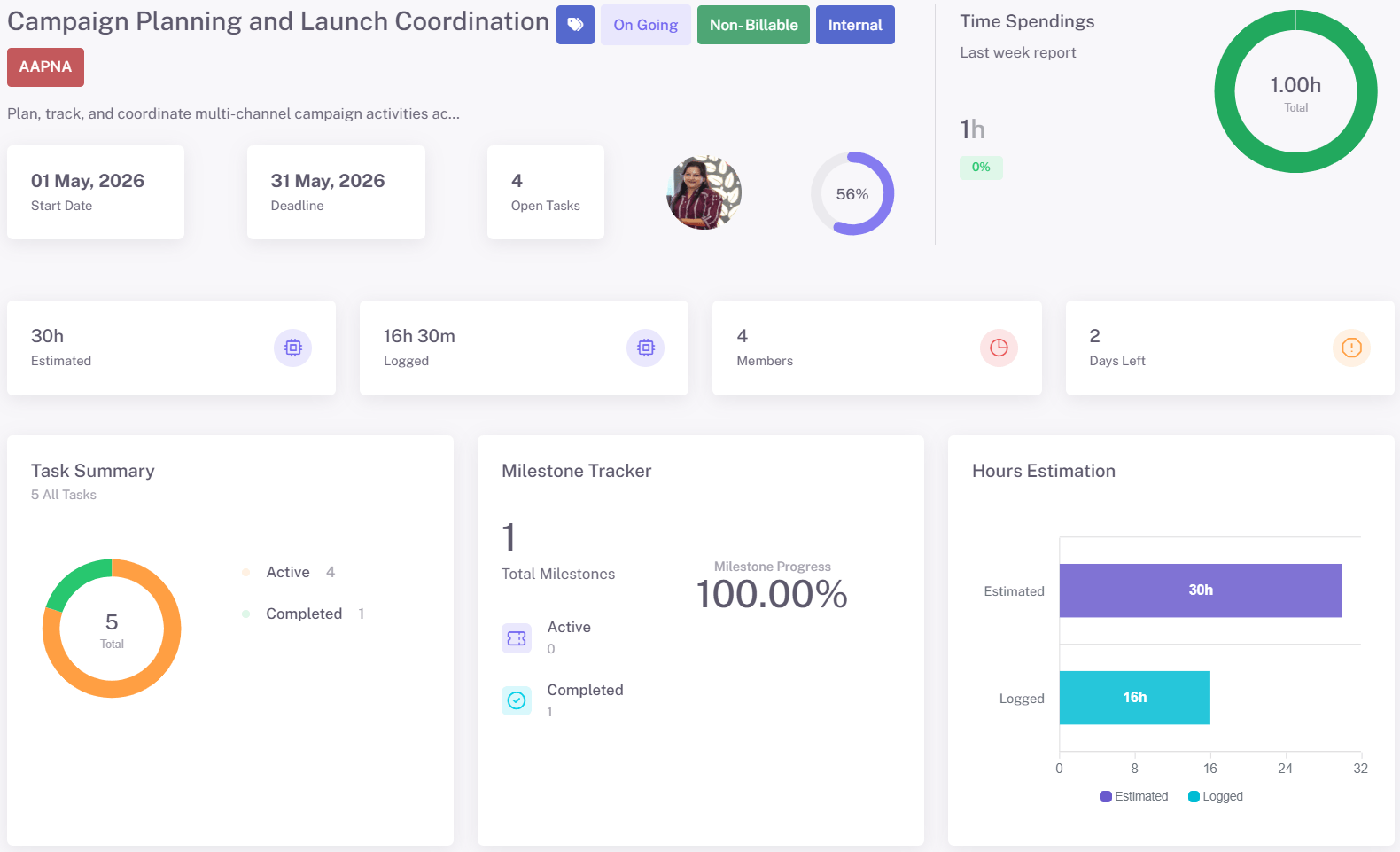
Project Dashboard
See project progress without digging through multiple views.
Track milestones, ownership, task status, and project reports from one dashboard, so teams can identify delays and priorities faster.
Includes: Dashboards • Milestones • Task tracking • Project reports
Kanban Board
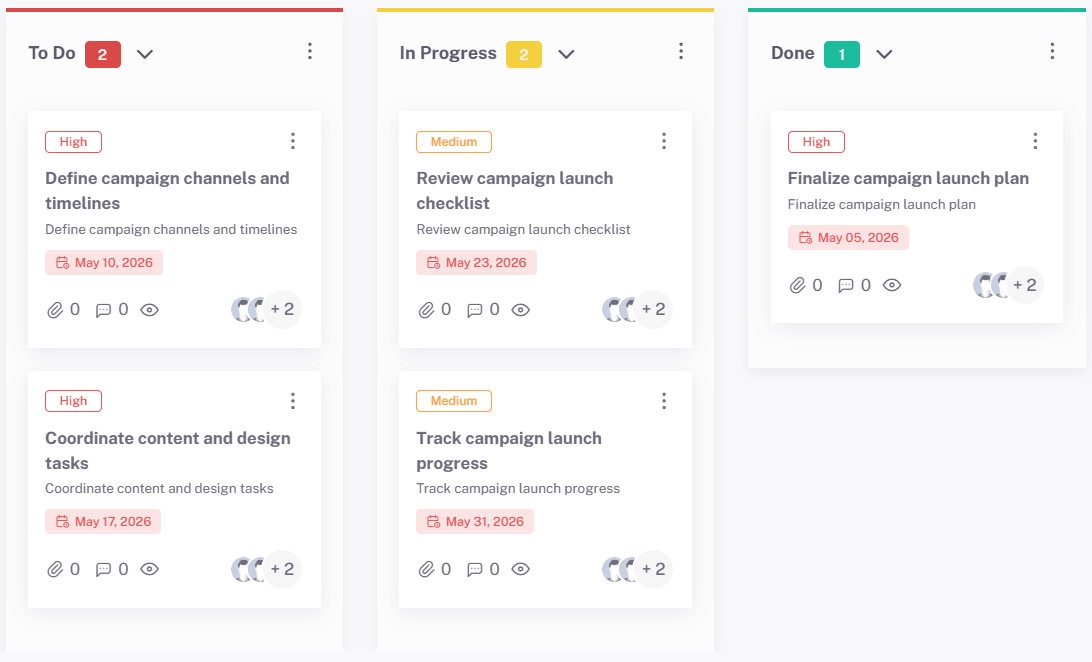
Move work through clear visual stages.
Organize tasks by stage, owner, and priority with Kanban boards that make workflow movement easier to follow across teams.
Includes: Kanban boards • Task management • Shared ownership • Smart task filters
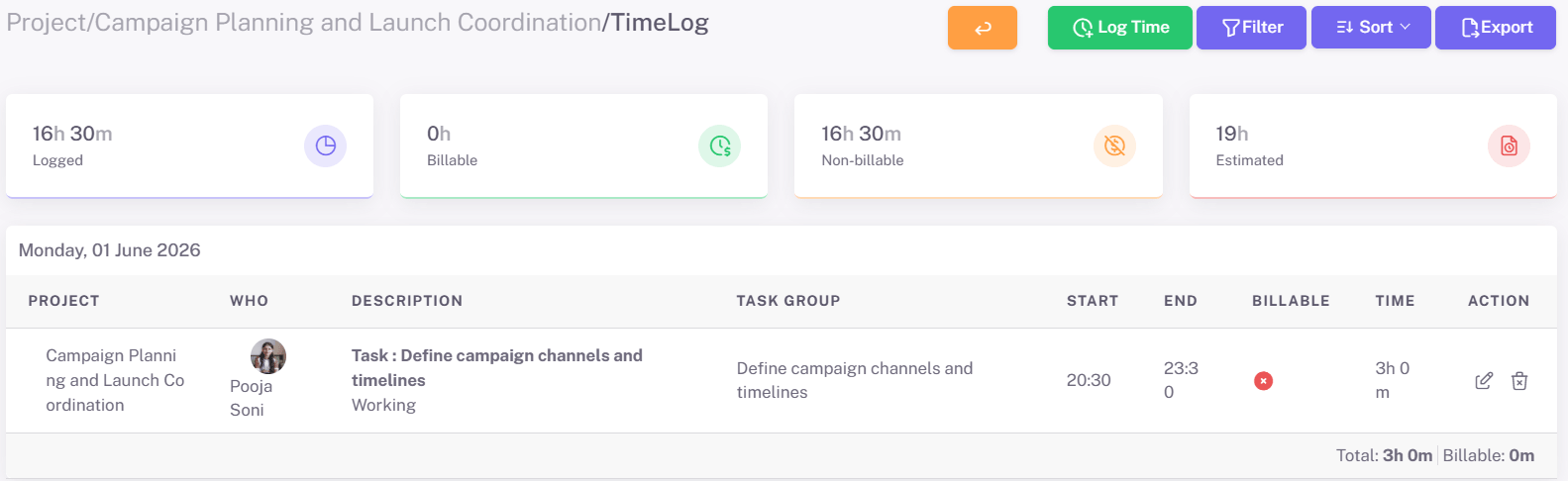
Timesheets & Productivity Reports
Connect task progress with actual work effort.
Review timesheets, billable/non-billable time, idle time, and productivity reports in one place for better operational visibility.
Includes: Auto timesheets • Productivity reports • Idle detection • Billable tracking
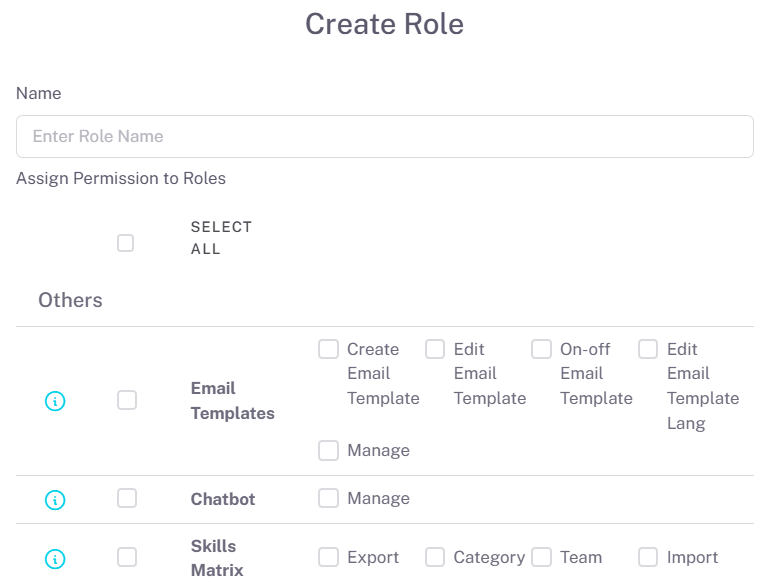
Role-Based Access
Keep every user focused on the right work.
Configure roles, permissions, and project access so teams get the visibility they need without unnecessary workflow noise.
Includes: Role management • Custom roles • Project permissions • User management
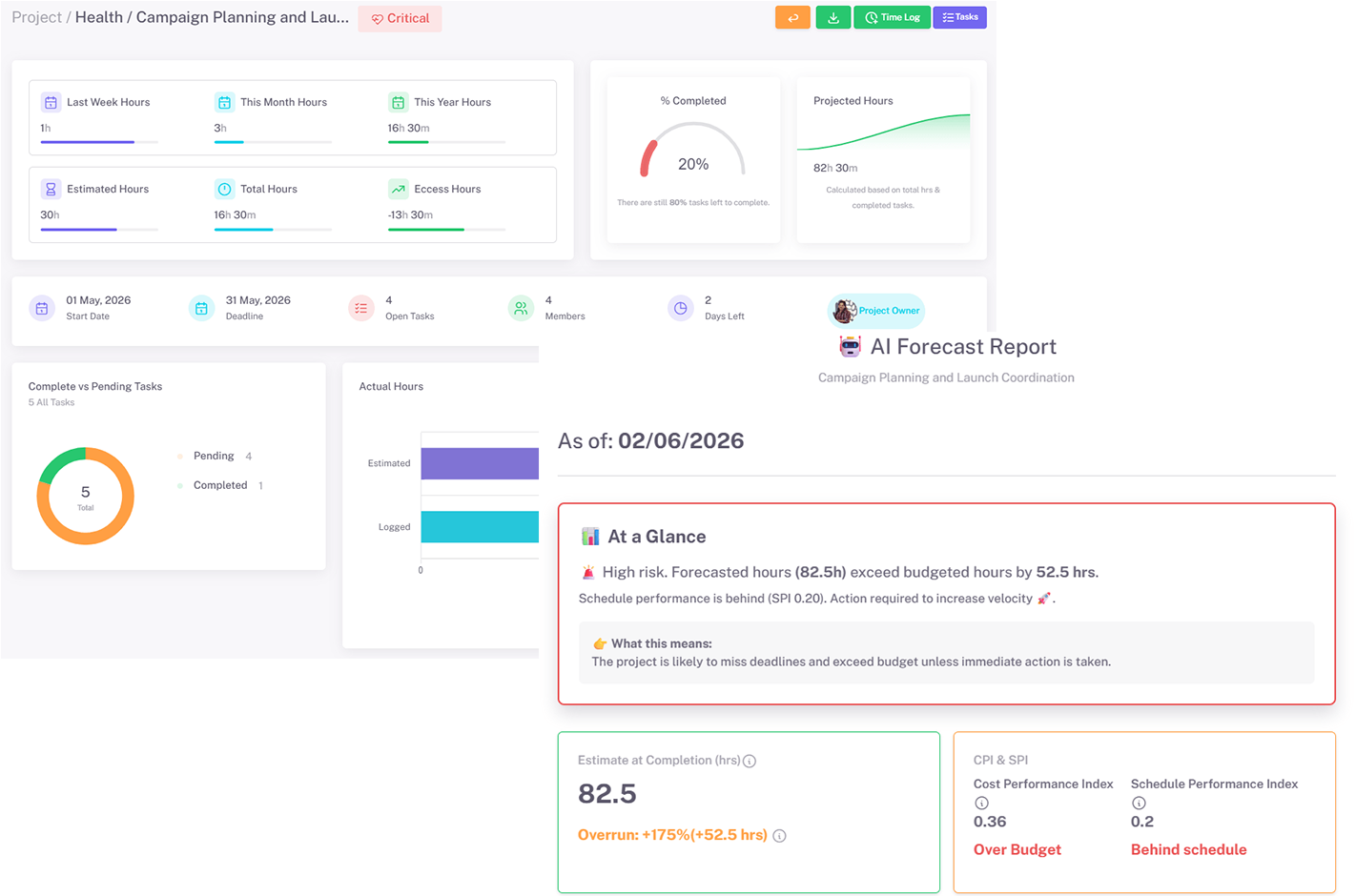
AI-Powered Reports
Turn project data into better decisions.
Use AI-powered reports, AI forecast, and AI work entries to reduce manual reporting effort and identify project patterns faster.
Includes: AI-powered reports • AI forecast • AI work entries • Health reports
- Testimonials
What Teams Say About Karya Keeper



- FAQs
ClickUp Alternative FAQs
What is the best ClickUp alternative?
The best ClickUp alternative depends on what your team wants to improve. If you want simpler project management, clearer workflow visibility, built-in timesheets, productivity reports, and easier adoption, Karya Keeper is a strong option to consider.
Is Karya Keeper easier to use than ClickUp?
Karya Keeper is designed for teams that want structured project execution without managing too many features, views, or setup layers.
Does Karya Keeper offer more than project management?
Yes. Along with project and task management, Karya Keeper includes Kanban boards, timesheets, auto timesheets, productivity reports, role-based access, and AI-powered reporting in selected plans
Why do teams look for ClickUp alternatives?
Is ClickUp good for project management?
Yes, ClickUp is a feature-rich project management platform. Karya Keeper may be a better fit for teams that want simpler execution, clearer dashboards, and built-in productivity visibility.
Can I switch from ClickUp to Karya Keeper?
Teams can start gradually by moving one project, workflow, or department first. This helps them test Karya Keeper’s boards, roles, dashboards, timesheets, and reports before expanding usage.