
Introduction
Wrike is one of those tools teams “graduate” into when projects start getting serious—more stakeholders, more approvals, more timelines, more reporting.
But if you’re here searching “wrike alternatives”, you’re probably feeling one (or more) of these:
- The tool is capable… but feels heavy to run day to day
- Your team spends more time managing the tool than managing work
- Visibility is messy—either too much noise or not enough clarity
- Reporting looks good, but execution still needs constant chasing
According to PMI’s Pulse of the Profession® 2024, the average project performance rate across all respondents is 73.8%.
That means a meaningful share of projects still miss business goals—and the tool you choose can either reduce friction or add to it.
In 15+ years of watching teams adopt (and abandon) work tools, the most common reason teams switch isn’t “missing features.” It’s adoption friction. If updates feel like admin work, people stop updating. And then the PM tool turns into a “status guessing machine.”
This guide will help you pick the right alternative based on how your team actually works, not just who has the longest feature list.
Quick shortlist (if you’re in a hurry)
- Need role-based clarity (leadership vs managers vs contributors) without noise → Karya Keeper
- Want maximum flexibility + all-in-one workspace → ClickUp
- Prefer visual workflows + strong automations → monday.com
- Need simple Kanban and fast adoption → Trello
- Engineering / Agile delivery is the center of work → Jira
- Need structured reporting + governance at scale → Smartsheet (or stay with Wrike if it already fits)
- Want docs + projects in one workspace → Notion
- Want client delivery + time/billing workflows → Teamwork
Why people look for Wrike alternatives
Wrike is strong. But the friction usually shows up when work becomes cross-functional and fast-moving.
Common reasons teams switch
There’s also a performance angle here. In PwC’s research, among the highest performing projects, 87% use project management software.
The takeaway: switching tools is only worth it if it improves adoption and execution—not just reporting.
- Setup and maintenance feels constant (spaces/folders/projects/fields/rules)
- Too many ways to do the same thing, so teams don’t stay consistent
- Permissions + visibility become complex to manage
- Stakeholders want “outcomes”, but teams get stuck in task-level noise
- Reporting requires extra structure, and structure requires extra admin
When Wrike is still the right choice
This matters and most “alternatives” posts skip it.
Wrike can still be a great fit if:
- Your team is already trained and consistent inside Wrike
- You need structured dashboards and approvals at scale
- You have someone who owns configuration and governance
- Your org is comfortable with a more “system” style tool
If your real problem is unclear ownership or weak decision-making, switching tools won’t fix that. It’ll just give you a new interface for the same chaos.
What to look for in a Wrike alternative (simple decision criteria)
Before you compare tools, answer these four questions. They’ll save you hours.
A useful reality check: PwC found that 77% of companies use project management software (company-wide).
So the real differentiator isn’t whether you use a tool—it’s whether the tool matches how your teams actually execute work.
- Do different roles need different views?
(Example: leadership needs portfolio health; managers need workload; contributors need today’s tasks.) - Is your work repeatable or ad-hoc?
Repeatable work benefits from workflows, approvals, templates. Ad-hoc work benefits from flexibility. - What’s the real success metric?
Speed? Fewer follow-ups? Cleaner handoffs? Better forecasting? - Do you want flexibility or guardrails?
Some tools are like Lego sets. Others are like a well-designed highway. Both can work—if they match your team.
More features rarely improve adoption. Clear defaults do. Tools win when people can open the tool and instantly know: what I own, what’s blocked, and what’s next.
Quick comparison snapshot (how to think about the list)
Instead of pretending there’s one “best” tool, I’ll keep it practical:
- Role-based clarity / structured execution: Karya Keeper, Smartsheet
- Visual workflows + automation: monday.com
- All-in-one customization power: ClickUp
- Simple Kanban: Trello
- Engineering-first delivery: Jira
- Docs + knowledge + tasks: Notion
- Client delivery / agency work: Teamwork
- Flexible work management (broad adoption): Asana
- Database-style workflows: Airtable
Now, let’s get into the tools.
The 10 best Wrike alternatives (with who they’re actually for)
1) Karya Keeper — Best for role-based clarity without micromanagement
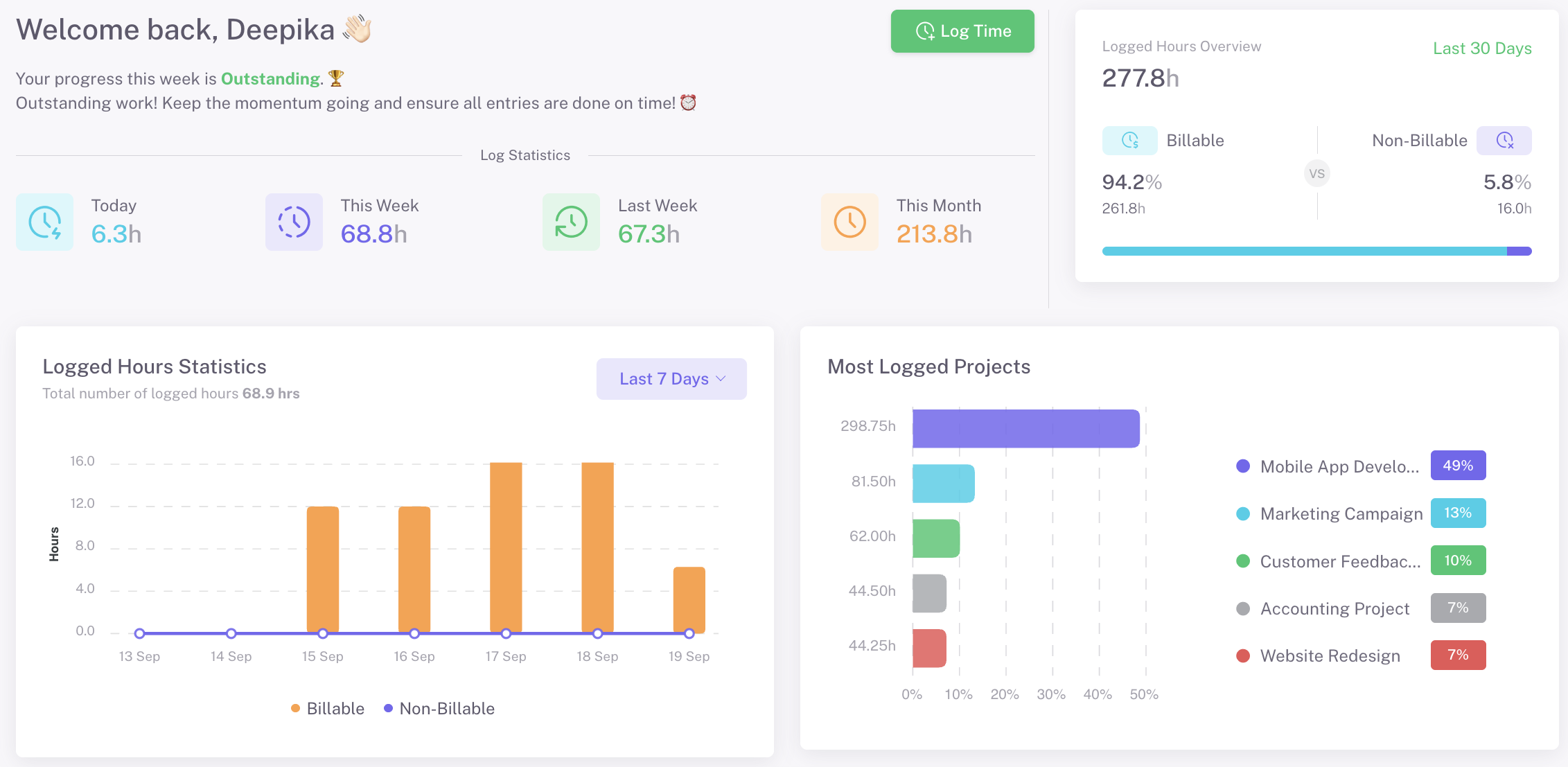
Best for: cross-functional teams that want clean ownership + different visibility for different roles
If your biggest issue with Wrike is “too much noise” or “too much admin,” Karya Keeper is worth a serious look.
The idea is simple: not everyone needs to see everything. Executives want progress and risks. Managers want ownership and bottlenecks. Contributors want only what matters to them.
Karya Keeper leans into that with role-based access/visibility so people stay focused and the tool doesn’t become a dumping ground.
Want to see how role-based visibility and workflow-linked execution looks in real usage? This short video gives a quick walkthrough.
Why it can be better than Wrike (for the right team):
- Cleaner role-based visibility (less distraction, fewer “status pings”)
- Works well for cross-functional execution (HR + IT + Finance style coordination)
- Emphasis on “what needs action” instead of just “what exists in the system”
Standout strengths (keep this verifiable + practical):
- Role-based access / views (so dashboards can differ by level)
- Workflow-friendly execution (good for structured work, approvals, coordination)
- Simple adoption curve when teams want clarity more than complexity
Trade-offs:
- If you need deep engineering sprint mechanics (epics, story points, backlog rituals), this may not be your first pick
- Teams who love heavy customization might prefer ClickUp
Choose Karya Keeper if: You want structured execution and role-based clarity—without turning project management into a full-time admin role.
In many orgs, leadership isn’t asking for more tasks—they’re asking for confidence. Tools that separate execution detail from leadership visibility reduce reporting effort and improve adoption.
2) monday.com — Best for visual workflows and automation
Best for: marketing, ops, cross-functional teams that want visual boards + automations
monday.com is popular because it’s easy to “see the work.” It’s a strong Wrike alternative when your team wants flexibility without needing a power admin.
Where it shines:
- Highly visual workflows (boards, timelines, dashboards)
- Automations for handoffs and recurring workflows
- Good cross-team visibility when set up well
Watch-outs:
- Without a simple governance rulebook, boards can get messy
- Costs can scale as teams add more usage/features (so plan your rollout)
Choose monday.com if: You want visual clarity + automation and you’re willing to keep a lightweight structure in place.
3) ClickUp — Best all-in-one alternative for power users
Best for: teams that want one workspace for tasks + docs + goals + dashboards
ClickUp gives you a lot of control. If you’re leaving Wrike because you want more flexibility (or more value in one place), ClickUp is often on the shortlist.
Where it shines:
- Deep customization (statuses, fields, views, automations)
- Can replace multiple tools if your team commits
- Useful when you want “everything connected”
Watch-outs:
- Flexibility can become complexity if you overbuild the system
- Adoption depends on having someone who owns setup and standards
Choose ClickUp if: You have a clear workflow owner and you value customization more than simplicity.
4) Asana — Best for clean, lightweight work management
Best for: teams that want simplicity + structure, without heavy admin
Asana is often “the calm middle ground” for many teams.
Where it shines:
- Easy to onboard
- Strong task + project structure
- Good day-to-day usability
Watch-outs:
- As teams scale, reporting and cross-team governance may need extra discipline
- If you need strict role-based visibility out of the box, you may need workarounds
Choose Asana if: You want a clean, widely adopted tool and your organization doesn’t need heavy governance.
5) Trello — Best simple Kanban-style alternative
Best for: small teams, simple workflows, fast adoption
If Wrike feels like overkill and you just need something people will use today, Trello is still a classic.
Where it shines:
- Almost zero learning curve
- Great for Kanban workflows
- Quick for lightweight collaboration
Watch-outs:
- Limited native reporting for serious portfolio visibility
- Complex projects need more structure than boards alone
Choose Trello if: You value simplicity and speed over deep reporting and governance.
6) Jira — Best for engineering and Agile delivery
Best for: software teams running sprints, backlogs, releases
Jira isn’t just a Wrike alternative—it’s a different category for a different need.
Where it shines:
- Strong Agile mechanics (sprints, backlogs, epics)
- Integrates well into dev ecosystems
- Great for engineering accountability
Watch-outs:
- Can feel heavy for non-technical stakeholders
- Not ideal if your work is mostly marketing/ops approvals
Choose Jira if: engineering workflows are the center of execution.
7) Smartsheet — Best for spreadsheet-style planning + governance
Best for: operations-heavy teams, PMOs, planning and tracking at scale
Smartsheet works well when teams think in grids, planning, and structured tracking—and still need workflow automation and visibility.
Where it shines:
- Strong structured planning (grid-first mindset)
- Good for approvals, operational workflows, reporting
Watch-outs:
- Some teams struggle if they want “daily task execution” first
- Needs a bit of upfront structuring to work well
Choose Smartsheet if: planning and structured reporting matter more than lightweight collaboration.
8) Notion — Best for projects + documentation in one place
Best for: product, content, knowledge-heavy teams
Notion is excellent when documentation and project context matter as much as tasks.
Where it shines:
- One workspace for docs + project databases
- Great for knowledge sharing and context
- Highly flexible layouts
Watch-outs:
- Task/project reporting isn’t as strong as purpose-built PM tools
- Requires templates and standards for consistent use
Choose Notion if: your team lives in docs and wants projects connected to knowledge.
9) Airtable — Best for database-driven workflows
Best for: teams managing structured workflows and datasets (ops, content ops, cataloging, pipelines)
Airtable is strong when projects behave like data: fields, records, statuses, relationships.
Where it shines:
- Powerful structure and filtering
- Great for workflows with lots of metadata
- Flexible views for different teams
Watch-outs:
- Not “task-first” by default—needs intentional setup
- Some teams need a simpler UI for day-to-day execution
Choose Airtable if: your workflow is data-driven and you need strong structure.
10) Teamwork — Best for agencies and client delivery
Best for: client-facing teams that care about delivery + time tracking + client visibility
Teamwork is built around delivering for clients, not just managing internal tasks.
Where it shines:
- Strong for client-focused delivery workflows
- Useful when you need time tracking and delivery visibility
- Designed for agency-style execution
Watch-outs:
- If you’re mostly internal product/ops work, it may feel too client-oriented
- Some teams prefer lighter tools unless they need the full delivery setup
Choose Teamwork if: client work, delivery workflows, and time/billing visibility are core to your business.
Which Wrike alternative should you choose?

Here’s the simplest way to decide:
If you want less noise + clearer responsibility across roles
✅ Karya Keeper, Smartsheet
If you want visual clarity + automation for handoffs
✅ monday.com
If you want maximum customization in one platform
✅ ClickUp
If you want the simplest “people will actually use this” tool
✅ Trello, Asana
If engineering delivery drives your organization
✅ Jira
If docs and knowledge are central to execution
✅ Notion
If your work is data-first workflows
✅ Airtable
If you deliver client work and need client-ready workflows
✅ Teamwork
Teams rarely fail because they picked the “wrong tool.” They fail because they picked a tool optimized for someone else’s workflow. Match the tool to how work actually moves in your org—handoffs, approvals, reporting rhythm—not to feature hype.
Switching from Wrike without pain: a practical migration checklist
Most teams do migration backwards. They start with “export everything.” That’s usually the wrong move.
Step 1: Don’t migrate everything—migrate what matters
- Identify your top 5–10 active projects
- Archive old projects and outdated fields
- Keep the first migration clean and focused
Step 2: Map roles before you map tasks
- Who needs portfolio view?
- Who owns delivery?
- Who executes tasks?
- Who needs read-only access?
If you solve visibility upfront, your setup becomes much simpler.
Step 3: Pilot with one team first
- Pick a team that’s motivated
- Run 2–3 weeks inside the new tool
- Fix templates and workflows based on real usage
Step 4: Adopt with habits, not training slides
- Daily “what’s next” check in the tool
- Weekly “blocked and risks” review
- One owner responsible for workflows/templates
If you do this right, the tool becomes the habit—not the burden.
Final recommendation
If you’re choosing between Wrike alternatives, here’s the honest truth:
The best tool is the one your team uses without being chased.
- Choose Karya Keeper if you want role-based clarity and structured execution
- Choose monday.com if you want visual workflows + automation
- Choose ClickUp if you need a configurable all-in-one workspace
- Choose Asana / Trello if adoption and simplicity matter most
- Choose Jira if engineering delivery drives the organization
- Choose Smartsheet if planning, governance, and reporting are the priority
- Choose Notion / Airtable if your work is docs-first or data-first
- Choose Teamwork if client delivery is your world
FAQs
It depends on your needs, but common top picks include Karya Keeper, monday.com, ClickUp, Asana, Trello, Jira, Smartsheet, Notion, Airtable, and Teamwork—each optimized for different workflows.
If you’re looking for structured planning and reporting, Smartsheet often feels closer in “governance mindset.” If you want flexibility and many views, ClickUp can also cover a wide range.
For many teams, Asana or Trello feel easiest because onboarding is simple. If your main problem is role-based noise, Karya Keeper can also feel easier because visibility is cleaner by design.
Many tools offer free plans with limits (typically around users, automation, storage, or advanced reporting). Free is fine for testing, but evaluate paid features if you need governance, permissions, or dashboards.
If you migrate selectively (active projects + clean templates), many teams can pilot within 1–2 weeks and roll out broader adoption over 3–6 weeks. Full migrations vary based on complexity and governance needs.